What's new and changing for 2026

See all of the changes

Expand all
  1. Health Care

    How much you pay for coverage

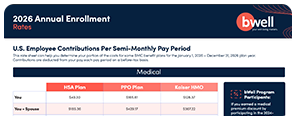
    Paycheck contributions for employees on the Blue Cross and Blue Shield (BCBS) PPO and HSA plans or the Kaiser HMO plan for medical coverage will see a per paycheck rate increase of 1.4%, depending on who you cover.

    BMC covers about 80% of the annual cost of medical coverage, and you cover the remainder. BMC shares all cost increases equally with employees to maintain the quality you have come to expect from our plans.

    Per paycheck contributions HSA Plan PPO Plan Kaiser HMO
    You $49.30 $165.61 $128.37
    You + Spouse $185.36 $429.17 $367.22
    You + Child(ren) $129.38 $322.50 $253.16
    You + Family $252.05 $626.96 $535.85

    Per paycheck contributions are 24 times per year.

    You will pay between $100 and $600 less for medical coverage in 2026 if you earned bWell rewards by August 31, 2025, and chose medical premium discounts. You’ll see the earned discounts on mybmcrewards.com after you click on Make Your Annual Enrollment Choices.

    To earn rewards and pay lower paycheck costs for medical coverage in 2027, embark on the bWell Arcade Universe towards legendary status while you (and your spouse*) make lasting changes to your overall well-being.

    *Spouses are not eligible to earn rewards.

    Healthcare Flexible Spending Account contribution limit increase

    The 2026 Healthcare Flexible Spending Account (FSA) contribution limit is projected to be $3,400. You can carry forward up to $660 from 2025 for use in 2026, and in 2026 the carryover is projected to be $680. See 2026 limits on tax savings accounts.

    Dependent Care Flexible Spending Account contribution limit increase

    For 2026, you can contribute up to $7,500 to your Dependent Care Flexible Spending Account (DCFSA). This is a $2,500 increase from 2025. DCFSA contributions do not roll over to the next year.

    Cost-saving tips when you need care

    With inflation hitting everyone’s budgets right now, knowing how to save money when we need a medical procedure or service is good. Knowing how to save money when a medical procedure or service is needed is essential; that‘s why BMC partners with BCBS to bring you tools to help you choose the proper care that meets your needs and is within your budget.

    Health Advocacy Services — Call the number on your BCBS medical ID card to speak with an advocate. Advocates can help you identify ways to help you save money on health expenses before receiving a medical procedure or service. If you have questions or concerns about a medical bill, an advocate can help with that, too.

    Digital Health Solutions — The BCBS medical plans include several digital resources to complement your one-on-one experience with your doctor. These programs are available at no added cost and can help you manage a health issue. Services include coaching and, in some cases, may use internet-connected biometric devices and wearable sensors to help you and your family achieve health improvement goals. Learn more here.

    BCBS Member Rewards — Did you know you can shop and compare costs for over 1,600 health care procedures online using the BCBS Provider Finder tool? Just like shopping for new tires for your car or a new computer, doing a little comparison shopping can really pay off.

    The price of health care services can differ by hundreds and sometimes thousands of dollars based on where you get care. Higher cost doesn’t always mean better quality. By choosing a cost-effective option for your care, you can save money on your out-of-pocket costs and could earn a cash Member Reward.

    Take a look at these examples:

    Medical Procedure Provider A Cost Provider B Cost
    MRI of the Brain $682 $3,849
    Knee Replacement $17,003 $61,980

    How Do Member Rewards Work?

    It’s easy. Just follow these steps when a doctor suggests a medical procedure or service:

    1. Log into Blue Access for Members at BCBSTX.com or on the app.
    2. Look for My Health > Find Care. Then you can look for doctors and hospitals. Do your search to compare your choices and select a reward-eligible location.
    3. Have the procedure or service at the reward-eligible location you chose.

    Once the claim is paid, you’ll receive a check in the mail.

  2. Save More in Your HSA

    The IRS has increased contribution limits for Health Savings Accounts. For 2026, you can contribute $4,400 for individual coverage (up from $4,300) or $8,750 for family coverage (up from $8,550). The catch-up contribution limit for those who are 55 or better remains $1,000. See limits for all tax savings accounts here.

    If your base salary is $75,000 or less If your base salary is more than $75,000
    Employee-Only Coverage Other Coverage Levels Employee-Only Coverage Other Coverage Levels
    BMC Flat Seed $200 in January and July for a total of $400 $0 $0
    BMC matches your contributions (dollar-for-dollar) Up to $350 Up to $1,100 Up to $500 Up to $1,000
    BMC will match your HSA contributions each pay period in 2026
    Your contribution limit Up to $3,650 Up to $7,250 Up to $3,900 Up to $7,750
    Total 2026 contribution allowed by the IRS (yours and BMC’s) $4,400 $8,750 $4,400 $8,750
    If you are age 55 or better at any time during 2026, you can contribute an additional $1,000 to your HSA.

    The BMC Health Savings Account (HSA) is only available to employees enrolled in the BCBSTX HSA medical plan option. The HSA helps you pay for the cost of care for you and your eligible tax dependents not paid by insurance.

  3. Review Your Beneficiaries

    Beneficiary changes are often overlooked following divorce, remarriage, or after the death of a loved one who may be listed as one of your beneficiaries. Accurate beneficiary information means your assets will be distributed according to your wishes. We encourage you to take a few minutes during Annual Enrollment to confirm your beneficiary designations.

    To review, add or change your Life, AD&D, or beneficiary, go to MyBMC Rewards. To change your 401(k) and Health Savings Account beneficiary, access your account at NetBenefits.com.

  4. Do I Need to Enroll?

    Not sure if you need to enroll? Use this checklist for help. If you check ANY of these boxes, you need to enroll.

    I Want To:

    • Opt-out of BMC’s medical plans.
    • Contribute to a Health Savings Account (with BCBS HSA medical plan only).
    • Change my medical, dental, or vision plan(s).
    • Participate in a Flexible Spending Account (FSA). To participate in an FSA, you must enroll each year. This includes:
      • Health Care FSA
      • Dependent Care FSA
      • Limited Purpose FSA (with the BCBS HSA medical plan only)
    • Add or remove a dependent. Please note: You must verify any dependent you are adding to the medical plan with supporting documents (marriage certificate, birth certificate, etc.), or your dependent(s) will not be covered.
    • Increase or decrease coverage. For example, an increase from Employee + Spouse coverage to Family coverage.
    • Add, increase, decrease, or remove Supplemental Life Insurance coverage.
    • Add, increase, decrease, or remove Supplemental AD&D coverage.
    • Add or remove Supplemental Long-Term Disability coverage.
    • Add or remove the Group Prepaid Legal coverage.
    • Add or remove the Identity Theft coverage.
  5. If You Don’t Enroll by November 7

    Even if you are happy with your current coverage, we encourage you to review your enrollment elections yearly.

    If you don’t take action during Annual Enrollment, your 2026 BMC benefit coverage will continue with the 2026 paycheck contributions for the same coverages you have for 2025 with the exception of Health Savings and Flexible Spending Accounts. Remember, you must enroll if you want to change your coverage, add or remove dependents, or contribute to a Flexible Spending Account or Health Savings Account.

  6. How to Enroll

    Complete these steps between October 27 and November 7 to get the right coverage for you and your family.

    • The easiest way to access your benefits and enroll is through MyBMC Rewards. Log on to mybmcrewards.com and click on the Annual Enrollment tile on the main page.
    • Once you’re on the MyBMC Rewards website, you’ll be guided through simple steps to help you make the right decisions. Use online tools, like the Medical Plan Comparison tool, to help you understand your medical plan options.
    • Review the name, date of birth, and Social Security number of any dependent(s) you may cover.
    • Review any life insurance beneficiaries you have listed.
    • Review your benefits decisions and paycheck contributions to be sure they reflect your choices.
    • Click the Complete Enrollment button to submit your benefit elections. If MyBMC Rewards has your valid email address on file (under Your Profile), you’ll receive an email confirmation of your elections. Save a copy of your Confirmation of Enrollment after you complete your enrollment.
    • If you enrolled by phone, you’ll receive a confirmation statement in the mail after annual enrollment. Check it carefully!
    • If you find any mistakes, call Your Benefits Resources at 877-262-4849 immediately to correct any errors before December 28, 2025. After that, you won’t be able to change your elections for 2026 unless you have a qualifying event, like marriage, a new baby, or divorce.

    If you leave the enrollment website before submitting your elections, your benefit choices will not be saved. Look for the “Your Enrollment is Confirmed” page, which will contain a confirmation number for your transaction. This will signal that your enrollment is complete. Print this page for your records.

    If You Are Adding a New Dependent

    You must verify your dependent’s eligibility for benefits when you add a new dependent to your BMC medical coverage for 2026. Your Benefits Resources will send you a verification request notice and package to your home address. Follow the instructions in the package and respond with the necessary documentation by the deadline. Complete and return the requested documents by the deadline, or your dependents will be ineligible for coverage and removed from BMC benefits.

    Need Assistance?

    If you need enrollment assistance, call Your Benefits Resources at 877-262-4849 between 8 a.m. to 9 p.m. EST.